Temp root for models running Android 2.2 and 2.3
Created:
OS: Android
Below are instructions for acquiring temporary root on older Sharp models:
| model | address 1 | address 2 |
| SH-10B | 0x60000000 | 0x60000000 |
| IS01 | 0x60000000 | 0x60000000 |
| SH-03C | 0x60000000 | 0x60000000 |
| IS03 | 0x60000000 | 0x60000000 |
| SH-12C | 0x8c000000 | 0x8b000000 |
| SH-13C | 0x8c000000 | 0x8b000000 |
| SH-04D | 0x8c000000 | 0x8b000000 |
| IS05 | 0x8c000000 | 0x8b000000 |
| A01 | 0x8c000000 | 0x8b000000 |
| IS12SH | 0x8c000000 | 0x8b000000 |
| IS11SH | 0x8c000000 | 0x8b000000 |
| 003SH | 0x8c000000 | 0x8b000000 |
| 005SH | 0x8c000000 | 0x8b000000 |
| 006SH | 0x8c000000 | 0x8b000000 |
| 007SH | 0x8c000000 | 0x8b000000 |
| SH-02D | 0x8b000000 | 11 |
| IS13SH | 0x8b000000 | 11 |
| IS14SH | 0x8b000000 | 11 |
| C01 | 0x8b000000 | 11 |
| 009SH | 0x8c000000 | 0x8b000000 |
The package includes SHBreak v.2, SHBreak v.4, ISTweak, and AndroTweak. AndroTweak is the newer version of ISTweak.
The package also includes shdisphook with English instructions. This package is needed in case you don't have R/W permissions on /data -- When you launch SHBReak v.2, it will tell you "use shdisphook".
- Install the apps, check if installed on internal memory, move to internal memory if not.
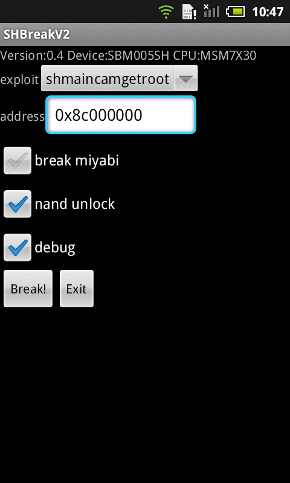
- Launch SHBreak v.2
- Verify that the device model is recognized correctly. Check below chart for correct memory address.
- Input the correct address number manually IF NECESSARY.
- Tap the "BREAK!" button. After a few seconds, a pop-up screen should be displayed with lots of info on it. Scroll to the bottom. If it says "Success!", then everything is fine.
- Start ISTweak. If you've installed AndroTweak, start that, and go to the "Tools" tab.
- If the operation you did using SHBreak was successful, the top-most button will be "Enable the SU command". Press it. In the notifications bar, a message will appear that the SU command has been enabled and the pound sign (#) will remain visible. Congratulations, your phone is now temp rooted!
NOTE: This is temporary root only. Root permissions will be lost when you reboot.
You can freeze or uninstall /system apps. Ensure you've made backups before that (use Titanium Backup).
Advertisement