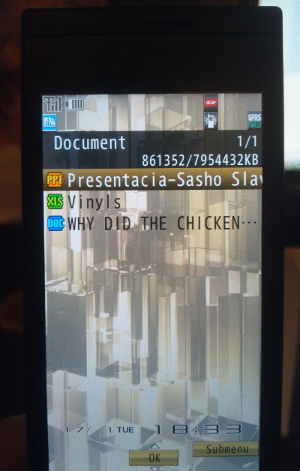
View MS Office files (.DOC, .XLS., PPT) on your Docomo keitai
Created:
Sharp Docomo keitais* can display Microsoft Office files - MS Word (.DOC), MS Excel (.XLS) and MS PowerPoint (.PPT). The new Office 2007/2010 formats - .DOCX, .XLSX, .PPTX - are not supported.
Uploading document files is easy, and no additional software is required.
1. Connect your phone to your PC using a USB data cable.
2. Switch the phone to microSD mode.
3. On your computer, navigate to the following folder:
[Removable Disk] \ PRIVATE \ SHARP \ DOCUMENT
4. Paste your MS office files there.
5. On your phone, exit microSD mode and navigate to:
LifeKit / Document Viewer (second page) / Document
Your files wll be there. That's it!
* The same probably applies for all other Docomo phones, regardless of their brand. I have used the Sharp SH-01B.
** The software Docomo File Manager (available for download from this website) is supposed to do the same but I have found out that it doesn't. The Document Viewer option stores the files you transfer in
[Removable Disk] \ PRIVATE \ NEC \ DOCUMENT \ DOC001
but the contents of this directory are not accessible through LifeKit / Document Viewer / Document or any other menu on the phone.
Advertisement