Sharp ADB Drivers
Created:
OS: Android
For any communication between your Sharp phone and your PC, e.g. use of rootkits, you need the Sharp ADB drivers.
The latest version of the driver package can be downloaded here: http://k-tai.sharp.co.jp/support/developers/driver/index.html – UPDATED 28.02.2019!
Installation instructions
- Unpack the downloaded archive somewhere on your PC.
- Connect your phone to the PC using a USB cable. You can let Windows install any generic drivers it finds but you will then update them to the Sharp ones.
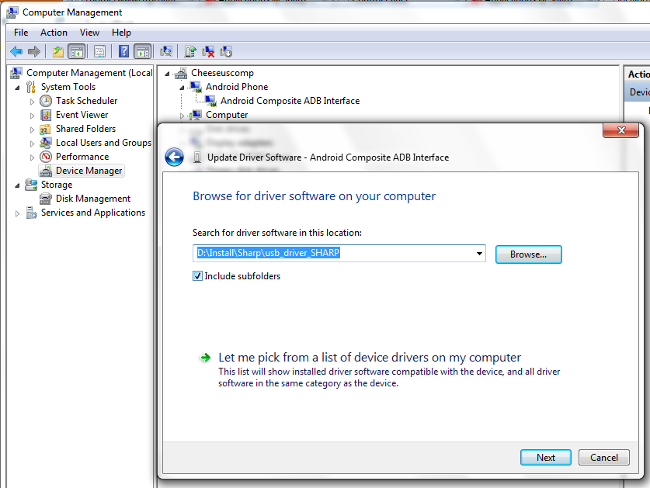
- Go to Device Manager: Start > right click Computer and select Manage > click on Device Manager in the new window.
- You will see 'Android Phone' in the main window list. Double click on it or single click the expand arrow. You will see a sub-item called 'Android Composite ADB Interface'. Right click on it and select 'Update Driver Software'.
- Choose 'Browse My Computer for driver software' and browse to the folder into which you unpacked the downloaded Sharp driver.
- Depending on your phone model, Windows will either update the driver (if the currently installed version doesn't iclude your model) or will say that 'Windows has determined that the driver software for your device is up to date'. In any case, you will have installed the ADB drivers, and now you can proceed to rooting – or bricking – you phone, whichever your luck may have in store for you :D
Advertisement